
GoHighLevel Integration: Send Leads from Lead Scrape to HighLevel

By Shane Daly, Content Writer at Lead Scrape
The Lead Scrape GoHighLevel (GHL) integration is a one-click connection that sends B2B leads directly from Lead Scrape search results into your HighLevel CRM. You can map any data field Lead Scrape collects (name, email, company, phone, website, address, SEO details, tech details, and more) to standard or custom GoHighLevel fields. No CSV files or manual data entry required.
- The GoHighLevel integration is included free with every Lead Scrape license
- Setup takes about two minutes using your HighLevel location ID
- Map any Lead Scrape field to standard GHL contact fields or custom fields you created in GoHighLevel
- Send data like name, email, company, phone, website, address, SEO details, tech details, and more
- One-click export sends leads directly into HighLevel contacts with no CSV files
With the Lead Scrape GoHighLevel integration, you skip the manual steps of downloading spreadsheets, formatting columns, and importing them into HighLevel. Lead Scrape sends your discovered business contacts straight into your GoHighLevel account through a secure OAuth connection. Because you configure the field mapping in Lead Scrape Settings, every data point lands exactly where you want it in your HighLevel contacts, ready for follow-up through HighLevel workflows within seconds.

How Does the Lead Scrape GoHighLevel Integration Work?
The integration works through a direct OAuth connection between Lead Scrape and your GoHighLevel account. After linking your HighLevel location ID and configuring your field mapping, a paper airplane export button appears in search results. One click sends your filtered leads into HighLevel contacts with all your mapped fields populated automatically.
Here is the complete workflow from search to CRM delivery:
- Search for leads in Lead Scrape. Use the search filters to find businesses by industry, location, company size, or other criteria.
- Click the paper airplane button. After your search results load, you will see a paper airplane icon next to the standard export button.
- Select HighLevel as your destination. If you have multiple API integrations connected, choose HighLevel from the list.
- Leads transfer automatically. Lead Scrape sends the filtered contacts directly into your GoHighLevel account as new contact records, with every mapped field populated according to your configuration.
How to Set Up the GoHighLevel Integration
Setup takes just a few minutes. You paste your HighLevel location ID into Lead Scrape settings, click Connect, authorize the connection in your browser through an OAuth flow, and then configure your field mapping. No API keys, webhooks, or middleware required.
Here is a video walkthrough followed by the written steps:
- Open Lead Scrape and go to Settings from the left sidebar. Scroll to the API Integrations section.
- Paste your HighLevel location ID into the HighLevel field and click the "Connect" button.
- Authorize in your browser. A new browser tab opens asking you to authorize Lead Scrape to access your GoHighLevel account. Click "Next" to continue.
- Select your location. On the next screen, select your location ID to complete the authorization.
- Configure field mapping. In Lead Scrape Settings, map any Lead Scrape data field to a GoHighLevel contact field or custom field. For example, map SEO details or tech stack data to custom GHL fields you created.
- Start sending leads. You can now send leads from Lead Scrape directly to your HighLevel account with all mapped fields populated automatically.
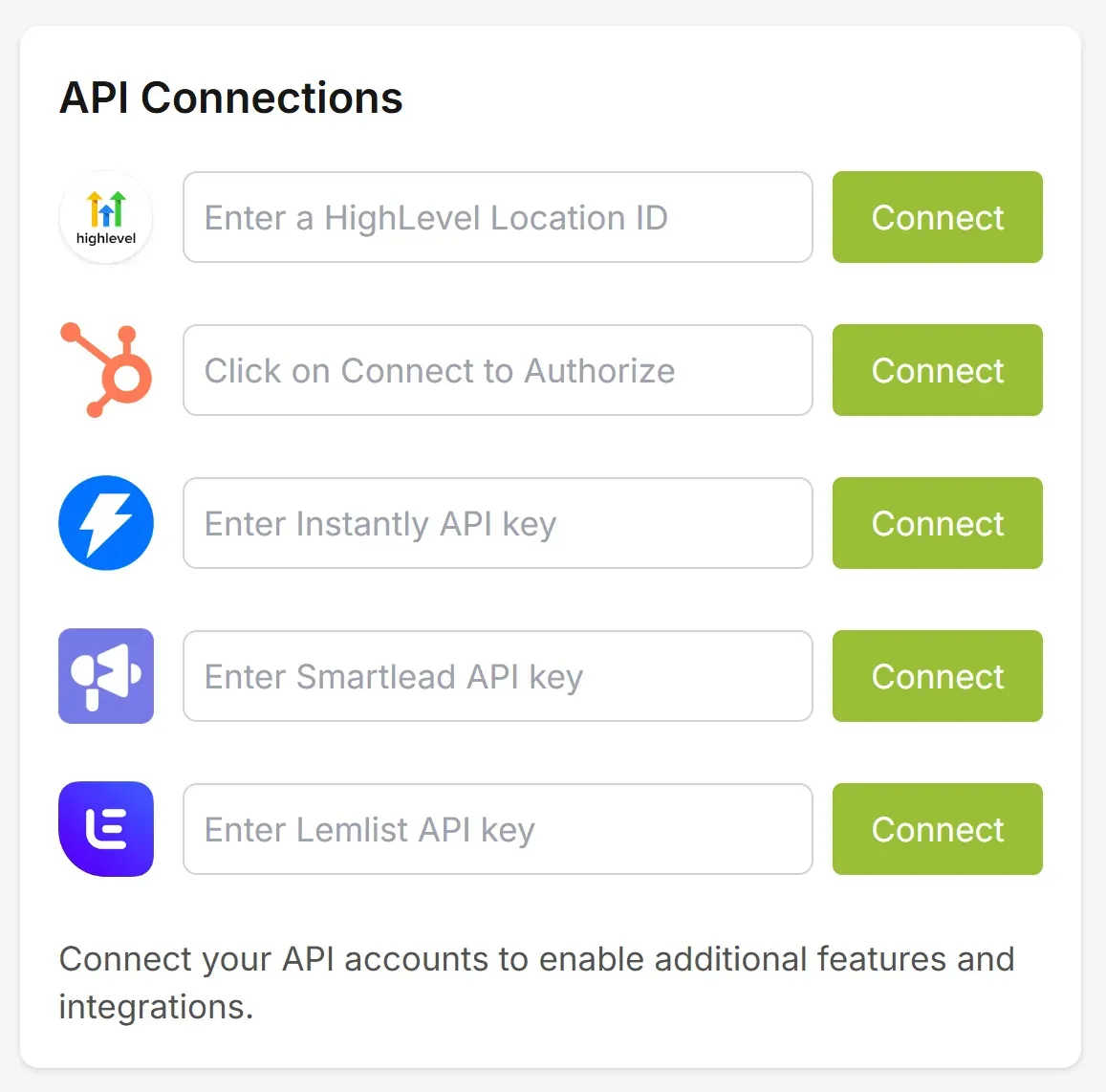
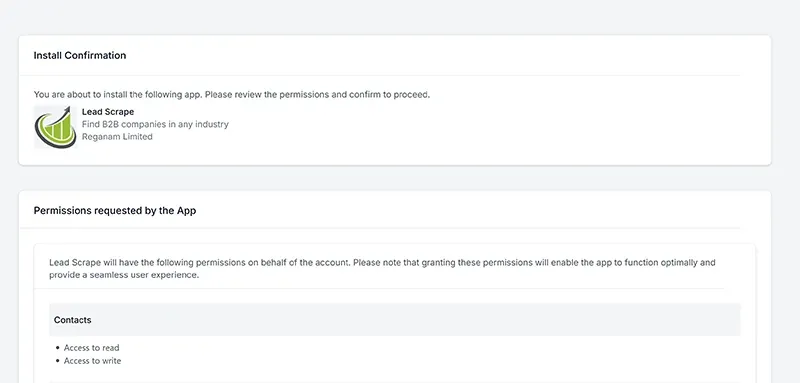
After completing the authorization and setting up your field mapping, the paper airplane export button becomes available in your search results. You are ready to start sending leads to GoHighLevel with all your configured fields transferring automatically.
What Data Does Lead Scrape Send to GoHighLevel?
Lead Scrape can send any data field it collects to GoHighLevel. The integration includes a custom field mapping feature in Lead Scrape Settings where you choose exactly which fields to transfer and where they land in your GHL contacts. You can map to standard GoHighLevel contact fields or to custom fields you created in HighLevel.
Here are examples of the data fields available for mapping:
| Lead Scrape Field | Description | GHL Mapping |
|---|---|---|
| Contact Name | First and last name of the business contact | Standard GHL contact field |
| Email Address | Email address for outreach | Standard GHL contact field |
| Company Name | The business name associated with the contact | Standard GHL contact field |
| Phone Number | Business phone when available | Standard GHL contact field |
| Website | Company website URL | Standard GHL contact field |
| Address | Business address including city, state, and country | Standard GHL contact field |
| SEO Details | Search engine optimization data for the business | Custom GHL field |
| Tech Details | Technology stack and platform information | Custom GHL field |
| Other Fields | Any other data Lead Scrape collects for a business or contact | Custom GHL field |
To use custom fields, create them in your GoHighLevel account first, then open Lead Scrape Settings and map the corresponding Lead Scrape fields to your GHL custom fields. Once configured, every export populates all your mapped fields automatically. Leads go directly into your HighLevel contacts, ready for outreach through HighLevel's built-in email, SMS, and workflow automation tools.
How Does Custom Field Mapping Work?
After connecting your GoHighLevel account, Lead Scrape Settings shows a field mapping interface where you pair each Lead Scrape data field with a GoHighLevel destination field. You can map to standard GHL contact fields (like name, email, phone) or to any custom field you created inside GoHighLevel.
This means the integration is not limited to basic contact details. If Lead Scrape collects SEO data, technology stack information, social media profiles, or any other business detail, you can route that data into a corresponding GHL custom field. For example:
- SEO details to a custom "SEO Score" field. Agencies running SEO services can push website SEO data into a custom GHL field and use it to prioritize outreach to businesses with the most optimization potential.
- Tech stack data to a custom "Technology" field. SaaS companies can identify which platforms a prospect uses and filter their follow-up messaging accordingly inside GoHighLevel.
- Industry category to a custom "Vertical" field. Agencies serving multiple industries can automatically tag leads with their sector for segmented HighLevel campaigns.
The mapping is a one-time configuration. Once you set it up, every subsequent export uses the same field mapping automatically. If you need to change the mapping later (for example, adding a new custom field), update it in Lead Scrape Settings and future exports will reflect the change.
What Are the Benefits of Using Lead Scrape for GoHighLevel Leads?
The primary benefit is speed. Lead Scrape cuts the time per lead batch from 15 to 30 minutes (manual CSV workflow) down to under 2 minutes through a direct API transfer. You also get fresher contact data because Lead Scrape searches live public business directories rather than static databases.
According to Salesforce research, sales reps spend only 28% of their time actually selling; the rest goes to administrative tasks like data entry and lead management. Automating the lead import step with the GoHighLevel integration helps reclaim that lost time.
- Skip manual CSV imports. No more downloading spreadsheets, formatting columns, and uploading them into GoHighLevel. The integration handles the transfer automatically.
- Always fresh data. Lead Scrape searches for current business listings, so your HighLevel leads are up to date rather than pulled from a stale database.
- Target by industry and location. Narrow your search to specific industries, cities, states, or countries before sending leads to your GoHighLevel account.
- Scale your pipeline faster. Generate hundreds or thousands of targeted leads in minutes and push them into HighLevel with one click.
- One-click workflow. The paper airplane button creates a direct pipeline from lead discovery to CRM follow-up inside GoHighLevel.
- Custom field mapping. Send any data Lead Scrape collects (SEO details, tech stack info, social profiles, and more) into custom GoHighLevel fields for richer contact records and smarter workflow automation.
GoHighLevel is the most-requested CRM integration among Lead Scrape users. With custom field mapping, agencies and sales teams can push far more than basic contact details into their HighLevel accounts. Download the free trial to test the integration and field mapping with your own GoHighLevel account.
"We manage 12 client accounts in GoHighLevel and used to spend hours importing lead lists. With Lead Scrape, our team generates and pushes 500+ leads per client per week without touching a spreadsheet."
Before Lead Scrape: Our team spent roughly 4 hours per week downloading CSV files, formatting columns, and uploading them into 12 separate GoHighLevel sub-accounts. After Lead Scrape: The same task takes under 30 minutes total. The team now pushes over 6,000 leads per week across all client accounts and has redirected the saved time toward campaign optimization and client calls.
"I'm a one-person sales team and GoHighLevel is my entire CRM. Lead Scrape cut my prospecting time from two hours a day down to about 15 minutes. I search, filter, click send, and my HighLevel pipeline is full before lunch."
What Are the Pros and Cons of the GoHighLevel Integration?
The main pros are one-click transfer, full custom field mapping, no middleware costs, and real-time data from live directories. The main con is single-location connections that require switching for multi-client setups. Here is the full breakdown:
| Pros | Cons |
|---|---|
| One-click transfer with no CSV files or middleware | Connects to one HighLevel location at a time (switching takes 30 seconds) |
| Map any Lead Scrape field to standard or custom GHL fields | Desktop application only (not browser-based) |
| Fresh real-time data from live business directories | Requires an active internet connection for OAuth and API calls |
| Included free with every Lead Scrape license | Custom field mapping requires initial one-time configuration |
| Under 2 minutes per batch, no volume caps | |
| Direct OAuth connection, no Zapier or Make.com needed |
If your primary need is fresh B2B contact data flowing into GoHighLevel without manual steps, the integration is a strong fit. The custom field mapping means you can transfer far more than basic contact details; send SEO data, tech stack information, or any other field Lead Scrape captures directly into your GHL workflow. If you need LinkedIn-enriched profiles, phone-verified leads, or B2C consumer data, you may want to pair Lead Scrape with a supplementary data source.
How Does Lead Scrape Work as a GoHighLevel Lead Generation Tool?
Lead Scrape is a desktop B2B lead generation application that searches public business directories in real time and pushes fresh contact records directly into GoHighLevel through a one-click OAuth integration with custom field mapping. It replaces static lead databases and manual LinkedIn prospecting with live, on-demand searches.
This positions Lead Scrape as a HighLevel lead generation engine: you define the industry, geography, and company size, and Lead Scrape fills your GoHighLevel pipeline with matching contacts. Because you control the field mapping, each contact record arrives in GHL with exactly the data points your workflows need. Agencies using GoHighLevel for client campaigns can generate CRM-ready leads across multiple industries without switching between separate prospecting tools and their HighLevel account.
How to Generate HighLevel Leads at Scale
Run targeted searches in Lead Scrape by industry and location, then push each batch into GoHighLevel with one click. Agencies managing 10 or more client sub-accounts use this approach to build segmented lead lists for every client.
A typical high-volume GHL workflow looks like this: search for plumbers in Houston, send 300 contacts to Client A's HighLevel location, switch to the next location ID, search for dentists in Phoenix, and send 400 contacts to Client B. Each batch takes under two minutes. Users regularly export 500 to 1,000 leads per session, and there is no per-transfer cap from Lead Scrape's side. The only limit is your GoHighLevel plan's contact capacity.
Lead Scrape's filters help you avoid overlap between batches. Narrow by zip code, company size, or specific keywords so each export delivers fresh, non-duplicate contacts into your HighLevel account.
What Is GoHighLevel?
GoHighLevel (also called HighLevel or GHL) is an all-in-one CRM and marketing automation platform built for agencies, marketers, and small businesses. It combines lead management, email and SMS marketing, sales funnels, appointment scheduling, and reputation management into one white-label dashboard.
The platform is popular with digital marketing agencies because it offers white-label capabilities, allowing agencies to rebrand HighLevel as their own software and resell it to clients. According to GoHighLevel, the platform serves over one million businesses across 150+ countries and has grown into one of the fastest-expanding CRM platforms in the agency space. It replaces the need to piece together separate tools for CRM, landing pages, and communication, reducing costs and simplifying operations for businesses of all sizes.

How Is GoHighLevel Changing the CRM Landscape?
GoHighLevel is replacing fragmented agency tech stacks with a single consolidated platform. HighLevel has grown past $80 million in annual recurring revenue and attracted a $60 million investment from PeakEquity Partners, making it one of the fastest-growing CRM companies in the SaaS industry. It now includes AI assistants, website builders, and membership tools that previously required separate subscriptions to ClickFunnels, Kajabi, or ActiveCampaign.
The GHL community has also become one of the most active in the CRM space, with dedicated Facebook groups, YouTube channels, and agency-focused forums generating thousands of discussions each week about workflows, integrations, and client management strategies. This grassroots ecosystem helps new users onboard faster and drives demand for tools that plug directly into GoHighLevel rather than relying on generic middleware.
This shift toward consolidation has changed how agencies think about their tech stacks. Instead of stitching together five or six separate tools with middleware like Zapier, agencies are moving toward platforms like GoHighLevel that handle CRM, email, SMS, funnels, and scheduling in one place. According to G2 review data, GoHighLevel holds a 4.6-star rating across hundreds of verified reviews, placing it among the highest-rated CRM platforms in the small business category. Direct integrations are replacing middleware-heavy setups because they are faster to configure, cheaper to maintain, and less likely to break when an API changes. Lead Scrape's native GoHighLevel connection fits this trend: leads go straight from search results into HighLevel contacts without any third-party automation layer in between.
For lead generation specifically, the market has also shifted. Traditional static lead databases are losing ground to real-time prospecting tools that pull fresh data on demand. According to HubSpot research, generating traffic and leads remains the top challenge for marketers year after year. GoHighLevel users increasingly want leads that are current and targeted rather than bulk lists compiled months ago. Lead Scrape addresses this by searching live public business directories at the moment you run a query, so the contacts arriving in your HighLevel CRM reflect today's data rather than yesterday's database snapshot.
Lead Scrape vs Manual CSV Import for GoHighLevel
Lead Scrape's direct integration eliminates three manual steps that account for roughly 80% of the time spent getting leads into GoHighLevel: data collection, column formatting, and CSV upload. The total time drops from 15 to 30 minutes per batch to under 2 minutes.
| Step | Manual CSV Import | Lead Scrape Integration |
|---|---|---|
| Find leads | Search directories, LinkedIn, or databases manually | Search by industry and location in Lead Scrape |
| Collect data | Copy data into a spreadsheet | Results appear instantly in the app |
| Format data | Match column headers to HighLevel's import format | Not needed; custom field mapping handles it |
| Export | Download CSV file from your source | Click the paper airplane button |
| Import into HighLevel | Upload CSV, map fields, confirm | Select HighLevel, done |
| Time per batch | 15-30 minutes | Under 2 minutes |
You could also use middleware tools like Zapier or Make.com to connect a lead source to GoHighLevel, but those add a separate subscription cost and require you to configure multi-step automations. Lead Scrape's direct integration skips the middleware entirely: leads go from search results into your HighLevel contacts in one click with no extra tools or monthly fees beyond your Lead Scrape license.
Lead Scrape also integrates with other CRM and cold email platforms. See the full list on the integrations page, including Instantly, Smartlead, Lemlist, and HubSpot.
How Does the GoHighLevel Integration Compare to Other CRM Tools?
Lead Scrape connects to GoHighLevel through a direct OAuth integration that transfers leads in one click without middleware, and includes custom field mapping so you can send any data point into GHL. HubSpot gets a similar direct treatment. For CRMs without a native connection (like Salesforce or Zoho), you export as CSV and import manually, or bridge the gap with Zapier or Make.com.
The GoHighLevel integration stands out for agency users because HighLevel's sub-account structure lets you maintain separate lead pipelines per client. The custom field mapping adds another advantage: agencies can send industry-specific data (like SEO metrics or tech stack details) directly into custom GHL fields tailored to each client's workflow. Most other CRMs require separate accounts or complex permission setups to achieve the same segmentation. If your business runs on GoHighLevel, the direct integration eliminates the middleware cost and configuration overhead that other CRM setups often require.
Other lead generation tools that work with GoHighLevel include Apollo.io, LeadFuze, and Instantly's built-in lead finder. Apollo and LeadFuze focus on LinkedIn-enriched contact data and typically charge per-lead or per-credit fees that increase as your volume grows. Instantly's lead finder is tied to their cold email platform, so it works best if you already use Instantly for outreach. Lead Scrape differentiates by searching public business directories in real time rather than pulling from a pre-built database, and it charges a flat annual fee with no per-lead costs or usage caps. If your workflow centers on GoHighLevel as the CRM, Lead Scrape's direct one-click integration avoids the extra middleware step that Apollo or LeadFuze would require to get contacts into HighLevel.
| Tool | Direct HighLevel Integration | Pricing Model | Data Source | Per-Lead Cost |
|---|---|---|---|---|
| Lead Scrape | Yes (one-click OAuth + custom field mapping) | Flat annual fee ($97-$247/yr) | Real-time public directories | None |
| Apollo.io | No (requires Zapier/webhook) | Monthly subscription + credits | LinkedIn-enriched database | Per credit |
| LeadFuze | No (requires Zapier/webhook) | Monthly subscription + credits | Pre-built database | Per credit |
| Instantly Lead Finder | No (Instantly CRM only) | Bundled with Instantly plans | Pre-built database | Per lead |
What Are the Best Tools and Methods for Generating GoHighLevel Leads?
The best method depends on your budget, volume needs, and data type. The five most common approaches are real-time directory search tools (like Lead Scrape), HighLevel's built-in capture forms, LinkedIn prospecting platforms, purchased static lists, and middleware automations. Here is how each one works:
- Lead Scrape (real-time directory search). Searches live public business directories by industry and location, then sends contacts directly into HighLevel with one click. Best for high-volume B2B prospecting with no per-lead fees.
- HighLevel's built-in tools. GoHighLevel offers forms, landing pages, and chat widgets that capture inbound leads from your own marketing. Best for businesses that already drive web traffic.
- LinkedIn prospecting. Manual outreach or tools like Apollo.io that enrich LinkedIn profiles. Best for targeted outreach to specific decision-makers, but time-intensive and often per-credit priced.
- Purchased lead lists. Static databases from vendors like ZoomInfo or D&B. Best for one-time bulk imports, but data freshness varies and costs can be high.
- Zapier/Make.com automations. Connect any lead source to GoHighLevel through middleware. Best for combining multiple data sources, but adds monthly subscription costs and configuration overhead.
For GoHighLevel users who need a steady flow of fresh B2B contacts without per-lead fees or middleware, Lead Scrape's direct integration provides the simplest workflow: search, filter, click, and your HighLevel pipeline is filled.
What Happens After Leads Arrive in GoHighLevel?
Imported leads appear as new contact records in your selected GoHighLevel location with all your mapped fields populated, including any custom GHL fields you configured. From there, you can tag them, assign workflows, trigger email or SMS sequences, and track them through HighLevel's pipeline stages.
From there, you can assign them to HighLevel workflows that trigger automated email sequences, SMS follow-ups, or task assignments for your sales team. Leads also appear in GoHighLevel's pipeline view, where you can drag contacts between stages (New Lead, Contacted, Qualified, Closed) to track progress visually. If you use GoHighLevel's Opportunities feature, imported leads can be converted into pipeline deals with custom values and close dates.
Because Lead Scrape sends structured data, your GoHighLevel workflows can personalize messages immediately using merge fields like {{contact.first_name}} and {{contact.company_name}}. There is no extra formatting or cleanup step between importing leads and launching your first follow-up sequence inside HighLevel.
Who Benefits Most from the GoHighLevel Integration?
Marketing agencies, sales teams, small businesses, consultants, and home service contractors benefit most. Any team using HighLevel as their primary CRM that needs a steady pipeline of fresh B2B contacts will save hours per week. According to McKinsey research, B2B companies that adopt data-driven sales practices achieve 2.3 times the industry average in revenue growth.
- Marketing agencies managing multiple client accounts in GoHighLevel who need separate lead lists segmented by industry and geography for each client. Custom field mapping lets agencies tailor the data flowing into each sub-account.
- Sales teams filling HighLevel pipelines with targeted B2B prospects across specific industries or regions. The integration lets reps go from search to active follow-up in under two minutes.
- Small businesses using GoHighLevel as their all-in-one CRM who want to build a prospect list without manually entering contacts one by one.
- Consultants running lead generation campaigns for clients through HighLevel's white-label platform, using Lead Scrape to source fresh contacts at scale.
- Home service contractors such as roofers, HVAC companies, and landscapers who use GHL to manage their sales pipeline but lack the time to prospect manually. Lead Scrape lets them search by trade and zip code, then push local business contacts straight into GoHighLevel for follow-up.
If your workflow depends on having fresh, targeted leads flowing into GoHighLevel, the integration removes the manual bottleneck between finding prospects and following up with them. Purchase Lead Scrape to unlock unlimited lead exports.
What Are the Requirements for the GoHighLevel Integration?
You need four things: a Lead Scrape license (Standard at $97/year or Business at $247/year), an active GoHighLevel account, your HighLevel location ID, and an internet connection. The integration itself is free with every Lead Scrape license. Here are the details:
- Lead Scrape license (Standard or Business edition) with API integration support.
- GoHighLevel account with an active subscription.
- HighLevel location ID for the sub-account where you want leads delivered.
- Internet connection for the OAuth authorization and API transfer between Lead Scrape and GoHighLevel.
There is no extra charge for the integration or custom field mapping. It is included with your Lead Scrape license. Lead Scrape Standard starts at $97 per year and Business at $247 per year, and both editions include the GoHighLevel integration with full field mapping at no additional cost. See current pricing on the buy page. The only additional cost is your GoHighLevel subscription, which is billed separately through HighLevel.
What Should You Know Before Connecting Lead Scrape to GoHighLevel?
The integration works smoothly for most workflows, but there are two practical limitations to consider: single-location connections and internet dependency. Here are the specifics:
- One location per connection. Lead Scrape connects to one GoHighLevel location at a time. To send leads to a different sub-account, update the location ID in settings and re-authorize. Switching takes about 30 seconds.
- Internet required. Both the initial OAuth setup and ongoing lead transfers need an active internet connection. Lead Scrape is a desktop application, so make sure the machine running it is online when exporting to GoHighLevel.
How Do Beginners Get Started with the GoHighLevel Integration?
No coding or technical experience is required. The entire setup from first install to first lead export takes just a few minutes. If you can copy a location ID from your GoHighLevel settings and click a few buttons, you can connect the two platforms and start sending leads. Here are the four steps:
- Download the Lead Scrape free trial from the download page. Install and open the application.
- Copy your GoHighLevel location ID. Log into your HighLevel account, go to Settings for the sub-account you want to use, and copy the location ID.
- Paste, connect, and authorize. In Lead Scrape, go to Settings, paste your location ID into the HighLevel field, click Connect, and authorize in your browser.
- Map your fields and send. Configure which Lead Scrape fields map to your GHL contact fields (including any custom fields you created). Then run a search and click the paper airplane button to send your first batch of leads into GoHighLevel.
The free trial includes access to the GoHighLevel integration so you can test the connection and field mapping before purchasing a license. If you get stuck at any point, the Lead Scrape support team can walk you through each step.
How Do You Troubleshoot the GoHighLevel Integration?
Most connection failures trace back to two causes: using the wrong ID (agency ID instead of location ID) or not completing the browser authorization. Work through these five steps in order to resolve the issue:
- Confirm you are using a location ID. The HighLevel field in Lead Scrape requires a location ID, not your agency ID. You can find your location ID inside GoHighLevel under Settings for the specific sub-account.
- Re-paste the location ID carefully. Copy the full location ID from GoHighLevel without leading or trailing spaces, then paste it into Lead Scrape's API Integrations panel and click Connect again.
- Complete the browser authorization. When the new browser tab opens, make sure you click "Next" and then select the correct location on the following screen. If you close the tab before completing both steps, the connection will fail.
- Check your GoHighLevel subscription. The integration requires an active GoHighLevel plan. Expired or paused accounts will not authorize.
- Check your internet connection. The OAuth flow and API calls require an active internet connection from the machine running Lead Scrape.
If the connection still fails after these steps, contact Lead Scrape support with your location ID and any error messages you see.
What Are the GoHighLevel Lead Generation Trends in 2026?
The biggest shift in 2026 is the move toward direct API integrations and away from middleware-heavy setups. Agencies are consolidating their tech stacks around GoHighLevel's all-in-one platform, and they want lead sources that plug in natively rather than routing through Zapier or Make.com.
Three trends are shaping how agencies fill their GoHighLevel pipelines this year:
- Real-time prospecting over static databases. According to HubSpot, generating traffic and leads remains the top challenge for marketers. Agencies increasingly prefer tools that pull fresh data on demand rather than purchasing pre-compiled lists that may be months old.
- AI-assisted lead qualification. GoHighLevel's built-in AI assistants can now pre-qualify leads through automated conversations. Pairing a prospecting tool like Lead Scrape with HighLevel's AI workflows creates an end-to-end pipeline from discovery to qualified appointment.
- No-code, direct integrations. The trend away from middleware reflects both cost pressure and reliability concerns. Direct OAuth connections (like Lead Scrape's HighLevel integration) eliminate the monthly subscription and potential failure points of multi-step automation chains.
For agencies building their 2026 lead generation stack, the combination of real-time prospecting tools with GoHighLevel's consolidation features represents the most efficient workflow currently available in the market.
Does Lead Scrape Work with GoHighLevel Sub-Accounts?
Yes. Lead Scrape connects to individual GoHighLevel sub-accounts using their unique location IDs. Agencies managing multiple client accounts switch between locations by updating the ID in Lead Scrape settings and re-authorizing, a process that takes about 30 seconds per swap.
This sub-account workflow is one of the main reasons agencies choose the integration. You can run a targeted search for one client's industry and geography, send those leads to that client's HighLevel sub-account, then swap the location ID and repeat for the next client. There is no limit to how many sub-accounts you can connect, though only one is active at a time. Agencies with 10 or more client locations use this pattern to generate thousands of segmented leads per week across all accounts.
GoHighLevel Resources
Find new potential customers today.
Download the Free Trial and see for yourself how Lead Scrape can help your business.
Frequently Asked Questions
-
How do I send leads from Lead Scrape to GoHighLevel?
After connecting your HighLevel location ID in Lead Scrape settings and configuring your field mapping, run a search to find leads. Then click the paper airplane button next to the export options in your search results. Select HighLevel as your destination and your leads transfer automatically into your GoHighLevel contacts with all mapped fields populated.
-
What lead data does Lead Scrape send to GoHighLevel?
Lead Scrape can send any data field it collects to GoHighLevel, including name, email, company, phone, website, address, SEO details, tech stack details, and more. In Lead Scrape Settings, you map each field to a standard GHL contact field or a custom field you created in GoHighLevel. This means you control exactly what data transfers and where it lands in your HighLevel contacts.
-
Can I map custom fields from Lead Scrape to GoHighLevel?
Yes. After connecting GoHighLevel in Lead Scrape Settings, you can map any Lead Scrape data field to any GoHighLevel field, including custom fields you created in GHL. For example, you could create custom fields in GoHighLevel for SEO data or technology details, then map those Lead Scrape fields to your custom GHL fields. This gives you full control over what data transfers and where it appears in your HighLevel contacts.
-
Is the Lead Scrape GoHighLevel integration included for free?
Yes. The GoHighLevel integration is included with every Lead Scrape license at no extra cost. Lead Scrape Standard costs $97 per year and Business costs $247 per year. Both editions include the HighLevel connection with no additional fee.
-
Can I filter leads before sending them to GoHighLevel?
Yes. Use Lead Scrape's search filters to narrow results by industry, location, company size, and other criteria before exporting. Then click the paper airplane button to send only your filtered results to GoHighLevel.
-
What should I do if the GoHighLevel integration is not working?
First confirm you are using the correct HighLevel location ID, not your agency ID. Re-paste the location ID without extra spaces and click Connect. When the browser authorization tab opens, make sure you click Next and then select the correct location. If it still fails, contact Lead Scrape support with any error messages you see.
-
How many leads can I send to GoHighLevel at once?
There is no fixed cap on a single transfer. Lead Scrape sends your entire filtered result set to GoHighLevel in one batch. Users regularly push 500 to 1,000 contacts per export. The limit depends on your GoHighLevel plan's contact capacity rather than anything on the Lead Scrape side.
-
Can I use Lead Scrape to generate GoHighLevel leads for multiple clients?
Yes. Agencies managing several GoHighLevel sub-accounts can switch between location IDs in Lead Scrape settings. Run a targeted search for one client's industry and location, send those leads to that client's HighLevel sub-account, then swap the location ID and repeat for the next client.
-
What types of businesses can I find leads for using the HighLevel integration?
Lead Scrape searches public business directories across virtually every B2B industry, including construction, real estate, healthcare, legal, financial services, marketing, IT, and more. Filter by industry type, city, state, or country to find the exact audience your GoHighLevel campaigns need.
-
Does Lead Scrape work with GoHighLevel sub-accounts?
Yes. Lead Scrape connects to individual GoHighLevel sub-accounts using their unique location IDs. To switch between sub-accounts, update the location ID in Lead Scrape settings and re-authorize. Agencies managing 10 or more client locations use this workflow to build separate lead lists for each client.
-
What are the alternatives to Lead Scrape for GoHighLevel lead generation?
Alternatives include Apollo.io, LeadFuze, and Instantly's built-in lead finder. Apollo and LeadFuze focus on LinkedIn-enriched data and charge per-credit fees. Instantly's lead finder is tied to their cold email platform. Lead Scrape differs by searching public business directories in real time with a flat annual fee ($97-$247 per year) and a direct one-click GoHighLevel integration that requires no middleware.