
Lead Extractor: What It Is, How It Works, and the Best Tools in 2026

By Shane Daly, Content Writer at Lead Scrape
Last updated
A lead extractor is software that searches public online sources and returns B2B contact data as a structured file. It works through multiple B2B directories, public business listings, and company websites, then writes what it finds to a CSV you can drop straight into an outreach tool or a CRM.
What Is a Lead Extractor?
A lead extractor is software that automatically collects business contact information from publicly available online sources such as business directories, search engine results, and social platforms. It returns structured data that sales and marketing teams use to build prospect lists a few thousand rows at a time.
Lead Scrape queries multiple B2B business directories on every search and merges what comes back into one de-duplicated list, so a business listed in three places shows up once. The Standard edition covers three of those sources and the Business edition covers seven. Neither looks outside business directories, so a company that never got itself listed anywhere will not turn up no matter how you word the search.
What a lead extractor typically collects:
- Business name
- Phone number
- Email address
- Physical address
- Website URL
- Star rating and review count
- Business category
Say you sell office furniture and want to reach accounting firms across Texas. Without extraction software someone has to work the state city by city, open each listing, and paste the contact details into a spreadsheet. Dallas alone will eat an afternoon. One search does the same job and hands back hundreds or thousands of rows.
Tools in this category scan business directories, search engine results, mapping services, and social platforms. Which fields come back depends mostly on which source got crawled. Most return everything in the list above, plus owner or contact names and social profile links. Pay more and you also get industry classification codes, employee count estimates, and a founding year.
Public business listings hold up well as a source because companies maintain those profiles themselves to attract customers. A phone number changed on a directory shows up in the next crawl. Bounces and dead dials trace back to records nobody touched, and a static database rebuilt once a quarter sits unchanged for twelve weeks at a stretch.
For most small B2B teams the bottleneck is finding enough decent leads to work in the first place. A rep who spends Monday and Tuesday building a list has three days left to work it. Building the list is the part software takes over.
The full field list is on our features page.
How Does the Extraction Process Work?
You set the filters at the start and take the export at the end. Everything in between runs without you:
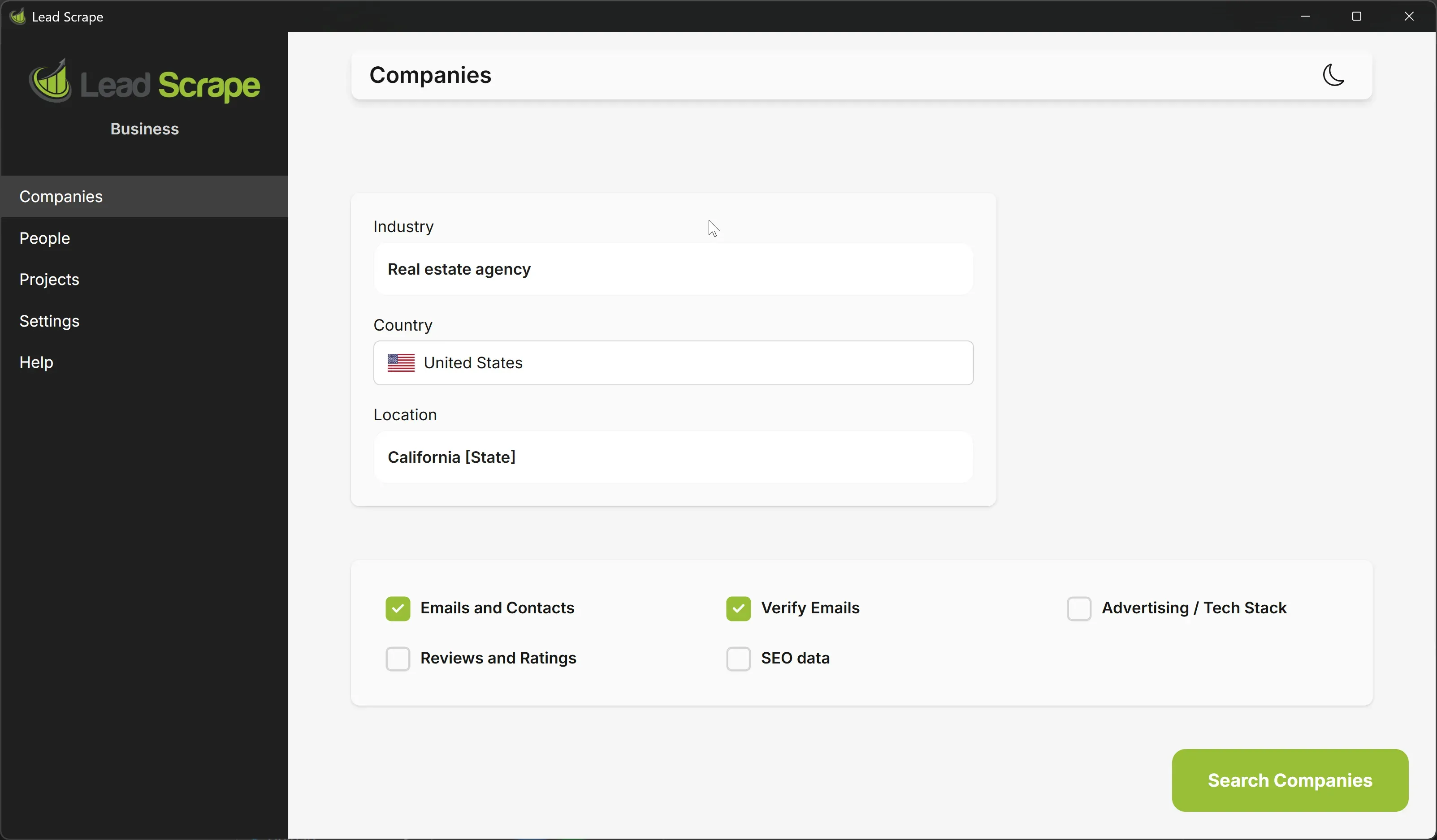
- Set your search filters. Pick a target industry such as dentists, a location such as California or London, and whatever extra criteria the tool offers, like a minimum review count.
- The software crawls public sources. It queries the B2B directories that match your criteria and opens each listing it finds.
- It extracts and deduplicates. Business names, emails, phone numbers, addresses and the rest come off each listing, and repeat records get merged.
- You export the results. The finished list saves as a CSV you can import into a CRM, an email platform, or a spreadsheet.
Search results feed the same pipeline. These tools run the queries a person would run, only thousands of them, pick the business listing pages out of the results, and open each one. That is how a company scattered across four different platforms still lands in your export as a single row.
Work that would take a person the best part of a day finishes in minutes. Download the free trial and point it at your own target market.
How to Get Started
You can be running your first search about five minutes after the download finishes. Download a free trial, install it, then type a target industry and location into the search box and hit search. Businesses come back with their contact details attached, and you export the lot as a CSV straight into your CRM or email platform. Allow longer for the search itself if you have pointed it at a whole state.
Lead Extractor vs. Web Scraper: What Is the Difference?
A web scraper is general purpose and will pull whatever sits on a page: product prices, news articles, raw HTML. Point one at a recipe blog and it will happily bring back recipes. A lead extractor does one job only. It collects business contact information from directories and search engines. The two overlap enough that people use the words interchangeably.
With a scraper you write the script, wire up the selectors, and handle pagination yourself before it returns a single row. Extraction tools put a form in front of you. Pick an industry, pick a location, and the structured contact data comes back without a line of code. If you are weighing up the practice itself, our guide to web scraping for lead generation covers the legal and ethical side, including GDPR and where the lines sit.
The technique is not limited to lead generation. The same plumbing runs market research, competitive analysis, and pricing intelligence for people who never touch a prospect list. The B2B version is narrow on purpose. It hands back a list you can start emailing on Monday morning rather than a folder of raw JSON. A general scraper such as the Apify Google Maps Scraper gets you the data and leaves the formatting and verification to you.
Lead Extractor vs. Purchased Lead Lists
An extractor builds the rows from live sources at the moment you hit search. Buy a list instead and you get a finished file, compiled a while back by somebody else and probably sold more than once already. On a shortlist the two look interchangeable, because both arrive as a spreadsheet of prospects.
Why Purchased Lists Fall Short
Most lists were compiled months or years before they reached you, and contact data does not sit still. People change jobs, businesses close, phone numbers get handed to whoever takes the office next. ZeroBounce puts email list decay at roughly 23% a year, so a file built two years ago is carrying more than 40% dead weight.
A single list runs $500 to $2,000 and up, and you take whatever fields the vendor happened to collect. The same file also goes out to other buyers, so your competitors may have worked those contacts before you opened the CSV. Filtering is rarely on offer.
Why Fresh Data Wins
Running the searches yourself fixes most of that. Each one pulls current information from live sources, and a flat annual license covers as many as you want instead of charging per file. You set the targeting by industry and location, down to a single city or a whole state on the Business edition, and nobody else got the same results. When your target market shifts, you run the searches again against the new criteria.
Per-credit databases price the same records near $0.50 each at list. A flat annual license with unlimited searches has no meter running at all, so the cost per lead keeps falling the more searches you do, and the worked cost model puts real numbers against a year of that.
IBM's January 2026 analysis of data quality costs reports more than a quarter of organizations losing over $5 million a year to poor data quality. Whatever share of that is down to stale contact records, it starts at the point the data goes into your systems.
Editions and current prices live on the pricing page.
The two approaches side by side:
| Factor | Lead Extractor | Purchased List |
|---|---|---|
| Data freshness | Pulled live at search time | Often 1-3 years old |
| Cost model | Flat annual license or subscription | Per-list fee ($500-$2,000+) |
| Contact limits | Unlimited searches | Fixed number of contacts |
| Targeting control | Filter by industry, location, keywords | Limited or no filtering |
| Email bounce risk | Lower (current data) | Higher (outdated contacts) |
| Reusability | Search again anytime | Single use per purchase |
What Can You Do with Extracted Leads?
The CSV that comes out of extraction software imports into most CRM and email platforms as it is, so nothing needs reformatting between the search and the first email. Where it goes from there depends on how your team sells.
Cold Email Outreach
Email still works in B2B. Filter the export down by industry and location before you send, and the campaign stays inside your customer profile.
Addresses pulled from live business listings have not been sitting on a file for two years, and deliverability is where that difference shows up. Dead addresses push your bounce rate up. Mailbox providers hold that against the sending domain rather than the campaign that caused it, so the damage carries into everything you send afterwards. Litmus reported in July 2025 that marketers put the return on their email programs somewhere between 10:1 and 36:1.
Pull every restaurant in Phoenix, then cut the list to the ones with a website and a verified address before you send anything.
Lead Scrape verifies the addresses it collects in the same pass as the rest of the business data, so the list is already clean when you export it. Our guide on using Lead Scrape for email extraction walks through the workflow.
Cold Calling Campaigns
Teams working the phones get direct business numbers with enough context attached (name, industry, location) to open with something specific. Fewer numbers ring dead, too. An old bought list is full of disconnected lines, and reps burn dial time on every one of them.
Local and regional prospecting suits the phone. A rep working plumbing companies in one metro area can pull the list, call through it, and mention the area or a recent review to get past the first ten seconds.
CRM Integration and Pipeline Building
The CSV imports straight into Salesforce, HubSpot, or Pipedrive, and Lead Scrape can push records to HubSpot, Pipedrive, or GoHighLevel over their APIs without the file step at all. From there you assign leads to reps, tag them by industry or region, and move them through your stages. None of that catches a bad record. A misspelled company name or a disconnected number gets assigned to a rep and worked like any other row.
A tidy CRM also tells you which outreach methods get answered, so you can tighten the extraction criteria over time.
Our guide on how to build a sales pipeline takes the stages in order, from the imported list through to the close.
Which Industries Use Lead Extractors?
These tools get used anywhere the sales process starts with finding a contact. The search, filter and export part looks the same across every industry below, and only the destination of the file changes.
Marketing agencies build lists of the businesses they want as clients. An agency that specializes in restaurants can pull every restaurant in a metro area and pitch web design or social media management to the owners directly. Our local lead generation guide covers more of what agencies do to reach clients nearby.
In real estate, the targets are property management companies, commercial landlords, and construction businesses. An agent working commercial leasing filters by zip code first, then approaches whichever businesses have an industry and a headcount that fit the space available.
SaaS sales teams keep outbound pipelines fed with companies that match their customer profile. For a project management vendor that might mean engineering firms in one region and marketing agencies in another, each vertical routed into its own sequence.
Staffing and recruiting agencies watch for companies that are hiring, or that sit in industries where turnover runs high, and hospitality is the obvious one there. A filter on industry and location narrows that down to the firms most likely to need a recruiter this quarter.
If outbound plays no part in how you sell, none of this is for you. The same goes for teams running purely on inbound, or anyone whose CRM is already enriched.
How to Choose a Lead Extractor
Salesforce's 2026 State of Sales report, a survey of 4,050 sales professionals, has the average seller spending 40% of their time actually selling. The rest goes on admin, research, and hunting for people to contact. A good extraction tool takes a bite out of that last part. Plenty of them do not. I have never found a way to tell which is which from a pricing page, so run one against your own target market before you pay for it.
A few things worth checking before you commit:
- Count the sources. One directory is thin. You want several behind every query, merged and de-duplicated, so a business listed in one place but not another still reaches your export.
- CSV export is the minimum. Excel, JSON, and a direct CRM push save you a conversion step later.
- Email verification built in means you are not paying a second service to clean the list before you send.
- Watch the pricing model. Per seat and per credit costs climb with use. Lead Scrape charges one annual fee for unlimited searches with nothing per lead.
Our features page covers where Lead Scrape lands on all four.
Download the Lead Scrape free trial, type in the industry and location you actually sell to, and run one search. Results land in a few minutes, and you will know how many businesses in your market are actually reachable before you have spent anything.
Popular Tools Compared
Four of the better known options in this market:
| Tool | Data Sources | Pricing Model | Best For |
|---|---|---|---|
| Lead Scrape | Multiple B2B directories | Flat annual license | B2B teams wanting unlimited searches with no per-lead charges |
| Apollo.io | Proprietary database, LinkedIn integration | Monthly subscription (free tier + paid plans) | Teams needing built-in email sequencing alongside contact data |
| PhantomBuster | LinkedIn, Google Maps, Instagram, web pages | Monthly subscription ($69-$439/mo) | Technical users comfortable with automation workflows |
| Outscraper | Google Maps, Google Search, reviews | Pay-per-result (usage-based, from $3 per 1,000) | One-off extraction projects with variable volume |
For a deeper comparison with additional tools, see our lead generation tools comparison. If your goal is specifically to extract business contacts from B2B directories, that guide compares the tools for the job with dated pricing and the key limitation of each.
Try Lead Scrape free, no credit card required. Download the free trial, enter your target industry and location, and pull your first batch of leads in minutes.
The Future of Lead Extraction
Privacy rules keep tightening. GDPR in Europe and the state privacy acts in the US narrow what can be collected and what it can be used for. That pressure lands hardest on tools reaching into personal consumer records. Tools limited to publicly listed business data have far less exposure to it. Worth working out which side of that line a tool sits on before you commit to a year of it.
Lead Scrape already pushes records to HubSpot, Pipedrive, GoHighLevel, Instantly, and Smartlead over their APIs, so the CSV upload step is optional. That is the direction most of these tools are heading, and the download-then-upload dance will look odd in a few years.
Extraction fills the top of the funnel and nothing below it. Our complete guide to B2B lead generation covers the rest.
About the Author
Shane Daly is a content writer at Lead Scrape. He has been writing about technology and marketing since 2014, covering B2B lead generation, sales automation, and the tools that help businesses grow. Based in Cork, Ireland, Shane writes practical guides on prospecting, outbound sales, and marketing technology.
Related Articles
- The Complete Guide to B2B Lead Generation
- Tools to Extract Business Contacts from B2B Directories
- Top 5 Email Finder Tools for Lead Generation
- How to Build a Strong Sales Pipeline
- Lead Generation Tools Compared (2026)
- B2B Lead Generation Strategies That Work
- Lead Extractor: What It Is, How It Works, and the Best Tools in 2026 (this article)
Find new potential customers today.
Download the Free Trial and see for yourself how Lead Scrape can help your business.
Ready to automate your lead generation? Lead Scrape offers a free trial with no per-lead charges. Download it here and test it on your own market.
Lead Extractor FAQ
-
What is a lead extractor?
A lead extractor is software that searches public online sources, mainly B2B business directories and social platforms, and collects contact data from them: business names, email addresses, phone numbers, addresses, and reviews. It works through thousands of listings in one run. Doing that by hand takes days. Everything it finds exports as a CSV you can load into an outreach tool or a CRM.
-
How is a lead extractor different
from buying a lead list?
An extractor collects contact data on demand from live sources, while a list vendor sells you something compiled somewhere else, often two or three years earlier. With an extractor you set the targeting yourself by industry, location, and business size, so the data is more current and fewer emails bounce. Bought lists come as they are, and a single file often costs more than a full year of the software.
-
What data can a lead extractor
collect?
A lead extractor typically collects business names, email addresses, phone numbers, physical addresses, website URLs, social media profile links, review counts, and star ratings. Some pull employee names, job titles, and company size indicators as well. Which of those you actually get depends on the source and on the tool doing the work.
-
Is using a lead extractor
legal?
Collecting publicly available business information with a lead extractor is generally legal. Business names, published email addresses, and phone numbers listed on websites and directories are details companies chose to make public. What you do with that data still falls under GDPR, CAN-SPAM, and their equivalents, so outreach has to comply with those. Scraping personal data from platforms whose terms forbid it is a different question, and best left alone.
-
How much does lead extraction
software cost?
It depends on the vendor and the pricing model. Subscription tools commonly run $50 to $450 a month depending on the tier. Lead Scrape charges a flat annual license fee instead, priced per edition and renewed each year, with unlimited searches and nothing charged per lead. Over twelve months that lands below a monthly subscription, and well below buying individual lists at $500 to $2,000 each.
-
What industries benefit most from
lead extraction?
Any B2B industry where prospecting starts with finding contact details, which covers most of them. Marketing agencies use it to source clients and SaaS companies to fill outbound pipelines. Real estate firms use it to reach property managers. So do staffing agencies that track hiring activity, and IT providers who sell one region at a time.
-
Can a lead extractor find email
addresses?
Yes. Most collect email addresses along with the rest of the data they pull from public business listings, company websites, and online directories. Whether you get one for a given business depends on whether that business published an address anywhere. Lead Scrape extracts emails and verifies them in the same pass, which keeps bounce rates down on outreach campaigns.
-
How accurate is data from a lead
extractor?
That depends on the sources and on how recently each business updated its listing. Tools pulling from live B2B directories tend to return current details, because companies keep those profiles up to date themselves. A purchased list cannot manage that, because it was compiled months or years before it reached you. Deduplication and verification on top of that clean up most of what is left.
-
What is the difference between a
lead extractor and a web scraper?
A web scraper pulls raw data from any website you point it at. Narrow that down to collecting business contact information from directories and search engines and you have a lead extractor. The extractor gives you an interface where you pick an industry and a location and get structured data back without writing code, while a scraper usually needs scripting and selector setup first. For B2B prospecting, the extractor gets you to something usable faster.
-
Can lead extraction be automated?
Yes. Once you set the target industry and location, the software runs the directory queries, collects the business contact data, drops duplicate records, and writes out the CSV. None of that needs further input from you, so the searching and the copying stop being your job.
-
Is there a free lead extractor tool?
Free tools exist. They usually cap how many results you can keep, hold back some of the data fields, and come with no support. Lead Scrape offers a free trial of the full software with no credit card required, so you can run it against your real target market before you decide.
-
What is a business lead extractor used for in B2B sales?
It builds targeted prospect lists. The tool pulls company names, email addresses, phone numbers, and other contact details out of public business directories. B2B sales teams, marketing agencies, and digital marketing specialists feed that data into cold email campaigns, call lists, and CRM pipelines.
-
What is a business lead scraper and how does it differ from a lead extractor?
They do the same thing: collect business contact data from online sources automatically, and the B2B prospecting industry uses the two terms interchangeably. Any difference is one of emphasis. "Scraper" points at the act of collecting, "extractor" at what lands in your export once it is done.