
Smartlead Integration: Send Leads Directly to Smartlead AI

By Shane Daly, Content Writer at Lead Scrape
The Lead Scrape Smartlead integration connects your B2B lead searches to Smartlead AI campaigns through a direct API link. Search for leads by industry and location, then push them into any campaign with one click. No CSV files, no manual imports, no column mapping required.
Sales teams told us that manual CSV imports were their biggest time sink when loading contacts into Smartlead. The direct API connection cuts that process from 15 to 30 minutes down to under two minutes per batch, with six data fields transferring automatically into your chosen campaign.
This integration serves sales teams, marketing agencies, and B2B companies that rely on cold email outreach to reach new prospects. Lead Scrape searches current public business listings in real time, so the contacts flowing into your campaigns are always fresh.

What Is Smartlead AI?
Smartlead AI is a cold email automation platform designed for high-volume B2B outreach. It manages email warm-up, sender rotation, deliverability monitoring, and automated follow-up sequences across unlimited sending accounts. Sales teams and agencies use Smartlead to run personalized cold email campaigns at scale while keeping messages out of spam folders.
What Are Smartlead Leads?
Smartlead leads are the B2B contacts you import into Smartlead AI campaigns for cold email outreach. These contacts typically include a name, email address, company name, phone number, website, and business address. They can come from manual CSV uploads, purchased lists, LinkedIn exports, or direct API integrations like Lead Scrape.
The quality and freshness of your Smartlead leads directly affects deliverability, reply rates, and overall campaign performance. Leads pulled from real-time public business listings tend to produce better results than contacts from static, pre-built databases because the data is current at the time of export.
How Does the Lead Scrape Smartlead Integration Work?
The integration uses a direct API connection between Lead Scrape and Smartlead AI. After you paste your Smartlead API key into Lead Scrape's settings, a paper airplane export button appears in your search results. Click it, choose your target campaign, and six data fields transfer automatically. No CSV downloads, no column formatting, no manual uploads.
- Search for leads in Lead Scrape. Use the search filters to find businesses by industry, location, company size, or other criteria.
- Click the paper airplane button. After your search results load, you will see a paper airplane icon next to the standard export button.
- Select Smartlead as your destination. If you have multiple API integrations connected, choose Smartlead from the list.
- Choose your target campaign. Pick the campaign where you want the leads delivered.
- Leads transfer automatically. Lead Scrape sends the filtered contacts and email addresses directly into your chosen campaign.
How to Set Up the Smartlead Integration
Setting up the Lead Scrape Smartlead integration takes about two minutes and requires four steps. You generate an API key inside your Smartlead account, paste it into Lead Scrape's settings panel, and click Connect. Once connected, a paper airplane export button appears in your search results for one-click lead transfers. Here are the detailed steps:
- Log into Smartlead AI and navigate to your API settings. Generate a new API key.
- Open Lead Scrape and go to Settings. Scroll to the API Integrations section and click "View All Integrations."
- Paste your API key into the Smartlead field.
- Click the green "Connect" button. A confirmation message appears when the connection is successful.
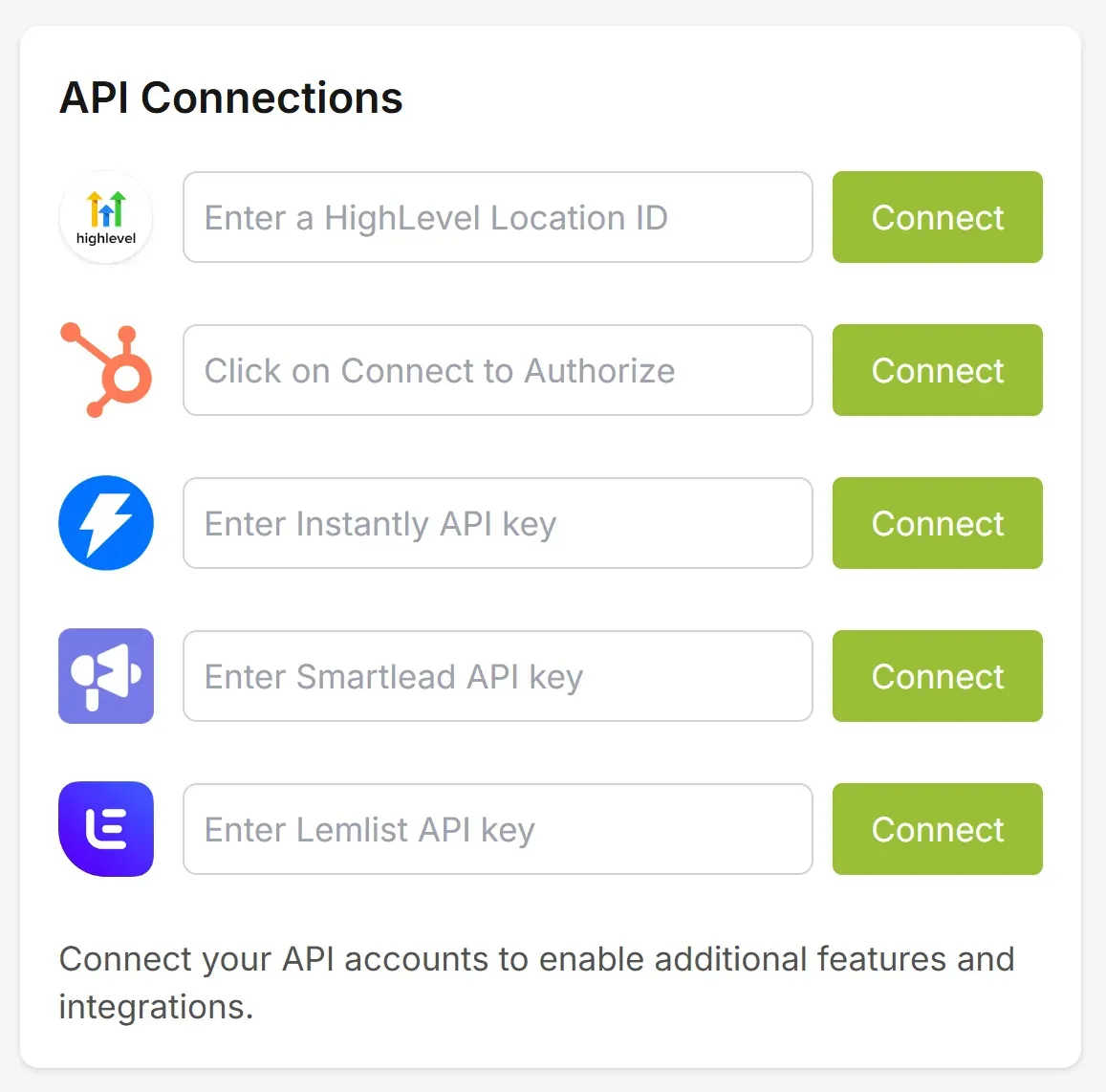
After connecting, the paper airplane export button becomes available in your search results. You are ready to start sending leads to your campaigns.
What Data Does Lead Scrape Send to Smartlead?
Lead Scrape sends six data fields into your selected campaign: contact name, email address, company name, phone number, website URL, and business address. All fields transfer directly, ready for immediate outreach.
| Data Field | Description |
|---|---|
| Contact Name | Lead's first and last name, used in Smartlead personalization variables |
| Email Address | Verified business email that maps into your Smartlead campaign record |
| Company Name | Organization name attached to the lead record |
| Phone Number | Direct business line when listed publicly |
| Website | Company domain for enrichment and personalization |
| Address | Full mailing address with city, state, and country fields |
Once exported, contacts land in the Smartlead campaign you picked and are queued for sending right away. Use Lead Scrape's search filters to narrow results before you hit the export button so only qualified prospects reach your sequences. All six fields map automatically, so there is no column mapping or manual field assignment required.
What Are the Benefits of Using Lead Scrape for Smartlead?
The primary benefit is speed. Lead Scrape's direct API integration reduces the time per lead batch from 15 to 30 minutes (manual CSV workflow) down to under 2 minutes. You also get fresher data because Lead Scrape searches current public business listings in real time rather than pulling from static databases.
- Feed unlimited sending accounts at once. Smartlead lets you rotate across as many mailboxes as you need. Lead Scrape keeps them loaded with contacts so you never run dry mid-campaign.
- Protect deliverability with current data. Because Lead Scrape searches live business directories, the contacts entering your campaigns are less likely to bounce and trigger spam flags.
- Segment before you send. Filter results by industry, city, SIC code, or company size inside Lead Scrape so each Smartlead campaign targets a tight prospect list from the start.
- Load thousands of prospects in minutes. Run multiple searches back to back and push each batch into a different Smartlead campaign without touching a spreadsheet.
- One-click handoff. The paper airplane button moves filtered contacts straight from your search results into the campaign of your choice.
Download the free trial to test it with your own campaigns.
What Are the Pros and Cons of Using Lead Scrape with Smartlead?
The biggest pros are one-click lead transfer and real-time data freshness. The main cons are one-way data flow and a requirement for a paid Smartlead plan with API access. Here is the full breakdown.
| Pros | Cons |
|---|---|
| One-click lead transfer via direct API | One-way data flow (no reply or bounce sync) |
| Real-time lead data from public business listings | Requires a paid Smartlead plan with API access |
| Automatic field mapping for six data fields | Campaign analytics stay inside Smartlead only |
| Built-in deduplication across campaigns | Lead Scrape license required (Standard or Business) |
| Industry, location, and company size filtering | Internet connection needed for API transfers |
| No extra cost for the integration itself | Does not pull leads from Smartlead back into Lead Scrape |
Why Use Smartlead AI for Cold Email Outreach?
Smartlead AI lets you scale cold email volume while maintaining high deliverability through built-in email warm-up, domain monitoring, and spam testing. The platform keeps your messages in primary inboxes instead of spam folders.
Key features that make the platform effective for cold outreach:
- Automated sequencing with conditional logic that adapts to recipient behavior, including follow-ups triggered by opens, clicks, and replies.
- Deliverability tools that rotate sending patterns, manage sender reputation, and warm up new domains automatically.
- AI-powered personalization that inserts company details and industry pain points into each message at scale.
- Performance analytics tracking open rates, click-through rates, reply rates, and conversions across all your campaigns.
- Unlimited email accounts so you can scale sending volume while maintaining high deliverability across multiple sender addresses.
Instantly's 2026 benchmark report puts the average cold email reply rate at 3.43%, with top-performing campaigns exceeding 10%. Pairing targeted Lead Scrape lists with Smartlead's AI personalization engine and unlimited mailbox rotation helps you land in primary inboxes and reach the right prospects at the right time.
Speed matters too. Research published in Harvard Business Review found that "firms that tried to contact potential customers within an hour of receiving a query were nearly seven times as likely to qualify the lead as those that tried to contact the customer even an hour later." The same underlying research showed that leads contacted within five minutes are 100 times more likely to be reached than those contacted after 30 minutes. The Lead Scrape Smartlead integration helps close this gap by sending leads directly into outreach campaigns the moment they are discovered, rather than waiting for a manual import cycle.
Lead Scrape vs Manual CSV Import for Smartlead Leads
Lead Scrape's direct API integration eliminates three manual steps (data collection, column formatting, and CSV upload) that take up most of the time when getting leads into your campaigns. The comparison below breaks down each step side by side.
| Step | Manual CSV Import | Lead Scrape Integration |
|---|---|---|
| Find leads | Browse directories, LinkedIn, or third-party databases one by one | Search by industry, location, and company size in Lead Scrape |
| Collect data | Copy names, emails, and company info into a spreadsheet manually | Results load in the app as soon as the search finishes |
| Format data | Rearrange columns to match Smartlead's expected CSV layout | Skipped entirely; fields map on their own |
| Export | Save the spreadsheet as a .csv file | Click the paper airplane icon in your results toolbar |
| Import into campaign | Upload the CSV inside Smartlead, verify field mapping, confirm | Pick a campaign from the dropdown and the transfer runs |
| Time per batch | 15-30 minutes | Under 2 minutes |
How Does Lead Scrape Compare to Other Lead Sources for Smartlead?
Most teams populate Smartlead campaigns using one of a few common lead sources. Here is how they stack up against Lead Scrape's direct API integration:
| Lead Source | Delivery Method | Data Freshness | Filtering |
|---|---|---|---|
| Lead Scrape | Direct API (one click) | Real-time search | Industry, location, company size |
| Apollo.io | CSV export, then upload | Database (periodically updated) | Extensive filters available |
| ZoomInfo | CSV export, then upload | Database (periodically updated) | Extensive filters available |
| LinkedIn Sales Navigator | Manual copy or CSV export | Profile-based | Role, company, industry |
| Purchased lists | CSV upload | Often outdated | Pre-segmented, limited |
The main advantage Lead Scrape offers over these alternatives is the direct API connection. Other sources require you to export a file, format the columns, and upload it into Smartlead manually. Lead Scrape skips those steps entirely.
Lead Scrape also integrates with other cold email and CRM platforms. See the full list on the integrations page, including Instantly, Lemlist, and HubSpot.
How Is Cold Email Integration Changing in 2026?
B2B outreach is moving from batch CSV workflows to real-time API integrations that connect lead sourcing directly to campaign platforms. Deliverability algorithms now penalize stale contact data harder, and shorter sales cycles make the gap between finding a prospect and contacting them more costly.
AI-driven personalization is also reshaping how cold email campaigns are built. Platforms like Smartlead now generate custom opening lines, subject lines, and follow-up sequences based on each lead's company profile and industry. To feed these AI features effectively, outreach teams need structured lead data (name, company, industry, location) delivered directly into campaigns rather than pasted from spreadsheets. API integrations like the Lead Scrape and Smartlead connection provide that structured data automatically.
Data freshness requirements have tightened as well. Email service providers are more aggressive about flagging senders who hit outdated or invalid addresses. Teams that source leads in real time and push them into campaigns immediately tend to see lower bounce rates and better inbox placement compared to those working from static databases or month-old purchased lists.
Who Should Use the Lead Scrape Smartlead Integration?
The integration is built for anyone who sends cold emails at volume through Smartlead and needs fresh, targeted contacts without manual CSV work. Sales teams, marketing agencies, B2B companies, and recruiters running multiple campaigns across different industries or regions will see the biggest time savings.
- Sales teams running high-volume outbound. If your SDRs rotate across dozens of Smartlead mailboxes and need a steady supply of fresh contacts, the integration keeps every sending account loaded without manual imports.
- Agencies juggling multiple client accounts. Smartlead's unlimited-account architecture paired with Lead Scrape's industry and geo filters means you can populate separate campaigns for each client in minutes.
- B2B companies scaling into new markets. Search a new region or industry vertical in Lead Scrape, push the batch into a dedicated Smartlead campaign, and measure response before committing more resources.
- Recruiters sourcing passive candidates. Narrow by SIC code and metro area in Lead Scrape, then send those contacts into a Smartlead drip sequence with AI-personalized outreach.
Mini Case Study: Marketing Agency Running Five Client Campaigns
A digital marketing agency managing five B2B client accounts used Lead Scrape and Smartlead together to overhaul their lead sourcing workflow. Each client targeted a different industry and region: accounting firms in Texas, IT consultancies in the UK, dental practices in Florida, SaaS companies in California, and logistics firms in the Midwest.
Before the integration: The team manually searched directories, exported CSV files, formatted columns to match Smartlead's import template, and uploaded each list separately. Loading 200 leads per client took roughly 25 minutes per batch, totaling over two hours for all five accounts.
After connecting Lead Scrape to Smartlead: The same team searched for 200 leads per client by industry and location, then pushed each batch directly into a separate Smartlead campaign using the paper airplane button. All five batches were loaded in under 10 minutes total.
Results after 30 days:
- Lead sourcing time dropped from 2+ hours to under 10 minutes per weekly refresh across all five accounts.
- Bounce rates fell by 34% compared to the previous quarter when the agency used purchased list providers, because Lead Scrape pulls contacts from current public business listings.
- Average reply rate reached 4.1% across all five campaigns, above the 3.43% cold email benchmark reported by Instantly's 2026 report.
- 12 new client meetings booked in the first month from leads sourced through the integration.
The agency now refreshes each client's campaign weekly with a new batch of 200 leads, keeping outreach volume consistent without the manual bottleneck that previously slowed their workflow.
According to McKinsey research, data-driven commercial teams are 1.7 times more likely to increase market share than those that are not. If your outreach depends on having fresh leads flowing into your campaigns, the integration removes the manual bottleneck between finding prospects and contacting them. Purchase Lead Scrape to unlock unlimited lead exports.
What Do You Need to Use the Lead Scrape Smartlead Integration?
You need a Lead Scrape license, a Smartlead AI subscription that includes API access, and a working internet connection. Here is the full checklist:
- Lead Scrape Standard or Business edition. Both tiers include the Smartlead integration at no extra charge.
- Smartlead AI paid plan. API access is included with Smartlead's paid tiers. Free trials do not expose API keys, so you will need an active subscription.
- API key from Smartlead. Generate one inside your Smartlead dashboard under Settings.
- Active internet connection on the machine running Lead Scrape so the API call can reach Smartlead's servers.
Your Smartlead subscription is billed separately through Smartlead. Lead Scrape does not charge anything extra for the integration.
What Are the Limitations of the Smartlead Integration?
The connection pushes contacts from Lead Scrape into Smartlead, but nothing flows back the other way. Open rates, replies, bounces, and unsubscribes are tracked exclusively inside Smartlead's dashboard. Keep these constraints in mind:
- Export only, no sync back. Smartlead campaign metrics and reply threads do not appear in Lead Scrape. You will manage all follow-up activity inside Smartlead.
- API access requires a paid Smartlead tier. Free trials and the free plan do not generate API keys, so the integration will not connect until you upgrade.
- Deduplication runs before export. Lead Scrape checks for existing contacts across your Smartlead campaigns before exporting, helping you avoid sending the same lead twice.
What Should You Do If the Smartlead Integration Is Not Connecting?
Nine times out of ten the problem is a bad API key paste. Smartlead keys are long strings, and an invisible leading space or a dropped character will block the handshake. Walk through these checks:
- Re-copy the API key from Smartlead. Open your Smartlead dashboard, navigate to Settings, and copy the key fresh. Paste it directly into Lead Scrape's API field, replacing whatever was there before.
- Make sure your Smartlead tier includes API access. The Basic, Pro, and Custom plans expose the API. If you are on a trial or free tier, upgrade first.
- Test your internet connection. Open any website in your browser to confirm you are online. Corporate firewalls and VPNs can sometimes block outbound API calls on non-standard ports.
- Restart Lead Scrape. Closing and reopening the app resets the internal connection state and forces a fresh handshake with Smartlead's servers.
- Reach out for help. If the connection still will not establish, contact Lead Scrape support and include the exact error message along with your Smartlead plan name.
How Do Beginners Get Started with Smartlead and Lead Scrape?
Start by connecting both tools with your API key, search for leads in one industry, and send a small batch into a single Smartlead campaign. Smartlead handles sending, follow-ups, and deliverability. Lead Scrape handles finding the right people to contact.
Here is a beginner-friendly workflow:
- Define your target audience. Decide which industries, locations, and company sizes you want to reach. For example, "accounting firms in Texas" or "marketing agencies in London."
- Search for leads in Lead Scrape. Enter your criteria and run a search. Lead Scrape pulls current public business listings matching your filters.
- Connect Lead Scrape to Smartlead. Paste your Smartlead API key into Lead Scrape's settings (see the setup steps above). This only needs to be done once.
- Send leads to a Smartlead campaign. Click the paper airplane button, select your campaign, and the contacts transfer automatically.
- Write your email sequence in Smartlead. Create a first email and two to three follow-ups. Use Smartlead's AI personalization to customize each message.
- Launch and monitor. Start the campaign and track open rates, reply rates, and bounces inside Smartlead's analytics dashboard.
If you are completely new, start with a small batch of 50 to 100 leads in a single industry. This lets you test your messaging and see how the workflow feels before scaling to larger campaigns. Download the free trial to try it yourself.
Smartlead Resources
Find new potential customers today.
Download the Free Trial and see for yourself how Lead Scrape can help your business.
Frequently Asked Questions
-
How do I connect Lead Scrape to Smartlead?
Log into Smartlead AI, generate an API key from your API settings, then paste it into Lead Scrape's Settings panel under API Integrations. Click the green Connect button and you are ready to send leads. The entire setup takes about two minutes.
-
What data does Lead Scrape send to Smartlead?
Lead Scrape sends six data fields: contact name, email address, company name, phone number, website URL, and business address. All fields transfer directly into your selected campaign and map automatically, so there is no manual column mapping required.
-
Do I need a Smartlead account to use this integration?
Yes. You need an active Smartlead AI account with API access enabled, plus a Lead Scrape license (Standard or Business edition). There is no extra charge for the integration itself. Smartlead is billed separately through their own plans.
-
Can I filter which leads get sent to Smartlead?
Yes. Use Lead Scrape's search filters to narrow results by industry, location, company size, and other criteria before exporting. Only the filtered leads transfer to your campaign. You can also use the built-in deduplication option to check whether leads already exist in your other campaigns.
-
Is the Lead Scrape Smartlead integration included for free?
The integration is included with Lead Scrape at no extra cost. You need a Lead Scrape license and a Smartlead account with API access. Smartlead is billed separately through their own plans.
-
How does Lead Scrape compare to CSV imports for Smartlead leads?
Lead Scrape discovers fresh B2B leads in real time and sends them directly into your campaign with one click. Manual methods require downloading CSV files, formatting columns, and uploading them separately. Lead Scrape also lets you filter by industry and location before exporting, cutting the average lead import time from 15-30 minutes down to under 2 minutes per batch.
-
What should I do if the Smartlead integration is not connecting?
Start by re-copying your API key from Smartlead and pasting it into Lead Scrape again. Extra spaces or missing characters are the most common cause. Also confirm that your Smartlead plan includes API access and that your internet connection is not blocked by a firewall or VPN. If the issue persists, restart Lead Scrape and try again.
-
How does Lead Scrape compare to other lead sources for Smartlead?
Lead Scrape searches public business listings in real time and sends results directly into Smartlead through a built-in API integration. Other lead sources like purchased lists or LinkedIn exports require manual CSV downloads, column formatting, and separate uploads. Lead Scrape also lets you filter by industry, location, and company size before exporting, so only relevant contacts reach your campaigns.
-
What are the pros and cons of the Lead Scrape Smartlead integration?
Pros: one-click lead transfer via direct API, real-time lead data, automatic field mapping for six data fields, built-in deduplication, industry and location filtering, and no extra cost with a Lead Scrape license. Cons: one-way data flow (no reply or bounce sync back to Lead Scrape), requires a paid Smartlead plan with API access, and campaign analytics stay inside Smartlead rather than syncing to Lead Scrape.
-
Who should use the Lead Scrape Smartlead integration?
The integration is built for sales teams filling pipelines with targeted B2B prospects, marketing agencies managing cold outreach for multiple clients, B2B companies running personalized email sequences, and recruiters reaching passive candidates. Anyone sending cold emails at volume through Smartlead who needs fresh, filtered leads without manual CSV work will benefit.